参考文档 https://docs.sentry.io/platforms/javascript/guides/nextjs/manual-setup/
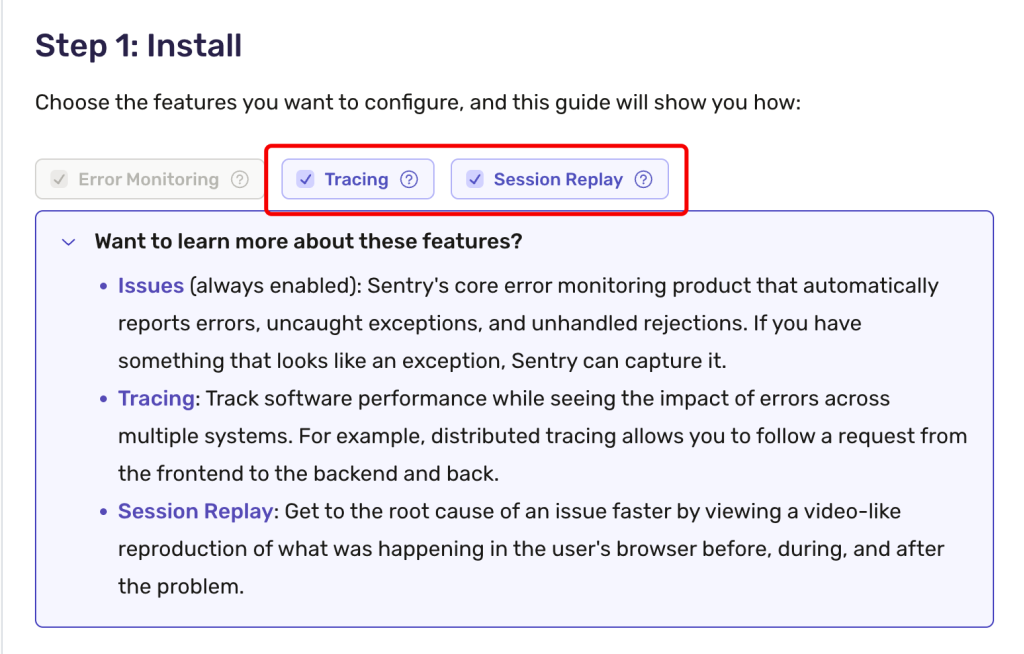
- 首先选择上 Tracing, Session Replay,否则下面的配置不会包含这些功能相关的选项。
2. 使用环境变量管理 Sentry org,project
因为有多处配置文件使用到这些变量,所以最好使用环境变量集中管理。其中包括:
SENTRY_AUTH_TOKEN=sntrys_***
NEXT_PUBLIC_SENTRY_DSN=https://***
NEXT_PUBLIC_SENTRY_PROJECT=***
NEXT_PUBLIC_SENTRY_ORG=***module.exports = withSentryConfig(nextConfig, {
org: process.env.NEXT_PUBLIC_SENTRY_ORG,
project: process.env.NEXT_PUBLIC_SENTRY_PROJECT,
});3. 运行环境 environment
一般情况,一个项目都会有测试环境(development)和生产环境(production)
我们可以分别定义 ENVIRONMENT 在不用的 .env 文件中,如:
ENVIRONMENT=productionENVIRONMENT=development在配置文件中使用:
import * as Sentry from "@sentry/nextjs";

Sentry.init({
  dsn: process.env.NEXT_PUBLIC_SENTRY_DSN,
  environment: process.env.ENVIRONMENT
});
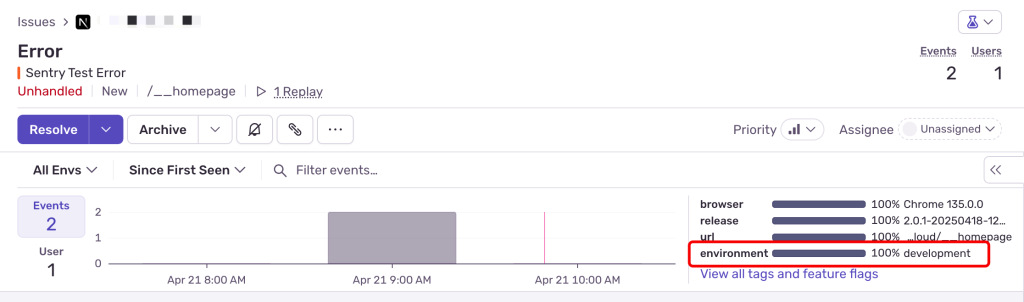
配置 environment 后可在Sentry中显示错误来源的运行环境。
4. 运行版本 release
此配置可用于定位错误触发的版本。
可在 CI 中获取 或 生成 BUILD_HASH, 写入到 .env.local 中,可在 next.js 中使用。
如果可以获取 git commit sha:
# 如果可以获取 git commit sha:
BUILD_HASH=$(git rev-parse --short HEAD)

# 如果不能回去 git commit 信息,可用其他方案,如当前时间
BUILD_HASH=$(date +%Y%m%d-%H%M%S)

echo "BUILD_HASH=$BUILD_HASH" >> .env.localconst packageJson = require("./package.json")
module.exports = withSentryConfig(module.exports, {
org: process.env.NEXT_PUBLIC_SENTRY_ORG,
project: process.env.NEXT_PUBLIC_SENTRY_PROJECT,
release: {
name: `${packageJson.name}@${packageJson.version}-${process.env.BUILD_HASH}`,
},
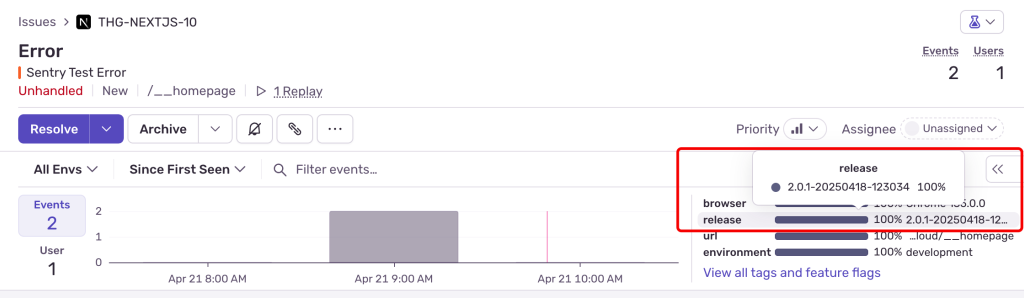
})配置后,Sentry中的错误信息会显示错误来源的版本号,这儿只会显示 @符号 后的内容。
5. 上传 Source Maps
参考 https://docs.sentry.io/platforms/javascript/sourcemaps
必须开启 productionBrowserSourceMaps
module.exports ={
  reactStrictMode: true,
  productionBrowserSourceMaps: true,
}const { sentryWebpackPlugin } = require("@sentry/webpack-plugin")
/**
* here is the config for webpack that not related to nextjs
*/
module.exports = /** @type {import('webpack').Configuration} */ ({
devtool: "source-map", // for sentry sourcemaps feature, we must enable source map
plugins: [
// Put the Sentry Webpack plugin after all other plugins
sentryWebpackPlugin({
authToken: process.env.SENTRY_AUTH_TOKEN,
org: process.env.NEXT_PUBLIC_SENTRY_ORG,
project: process.env.NEXT_PUBLIC_SENTRY_PROJECT,
}),
],
})SourceMaps 文件会在build后上传到 Sentry,并删除本地的 .map 文件,所以你并不会在打包结果中看到他们。
Awesome https://is.gd/N1ikS2
Very good https://is.gd/N1ikS2
Very good https://is.gd/N1ikS2
Awesome https://is.gd/N1ikS2
Awesome https://is.gd/N1ikS2
Very good https://is.gd/N1ikS2
Good https://is.gd/N1ikS2
Good https://is.gd/N1ikS2
Самые популярные банки, где можно получить кредит без отказа
кредит без отказа кредит без отказа .
Проверяйте кредитный рейтинг онлайн и управляйте своим финансовым будущим
узнать свой кредитный рейтинг http://www.budgetmasterexpert.ru .
Very good https://is.gd/N1ikS2
Very good https://is.gd/N1ikS2
Very good https://is.gd/N1ikS2
Awesome https://rb.gy/4gq2o4
Good https://rb.gy/4gq2o4
Very good https://rb.gy/4gq2o4
Простой способ проверить кредитный рейтинг перед оформлением крупного кредита
проверить кредитный рейтинг http://www.dengivperedservice.ru .
Качественная и долговечная печать на футболках в любом тираже
футболки с принтом на заказ https://www.pechat-na-futbolkah1.ru/ .
Магазин шин с постоянными акциями и специальными предложениями
интернет магазин автомобильных шин http://www.shini-kupit-v-spb.ru .
Very good https://rb.gy/4gq2o4
Very good https://rb.gy/4gq2o4
Good https://rb.gy/4gq2o4
Выберите лучшее рефинансирование кредита и начните экономить уже сегодня
рефинансировать кредит рефинансировать кредит .
Good https://rb.gy/4gq2o4
Very good https://urlr.me/zH3wE5
Next-level drone show with music, motion, and visual storytelling
light drones http://drone0-show.com/ .
Drones iluminados creando arte en el cielo para tu evento
empresa de espectáculos de drones https://show0-de-drones.com/ .
Калькулятор досрочного погашения с расчетом новой суммы платежей
кредитный калькулятор с досрочным погашением онлайн https://www.finanspro24.ru .
Awesome https://t.ly/tndaA
Awesome https://t.ly/tndaA
Good https://t.ly/tndaA
Awesome https://dub.sh/LAqZ3qv
Коммерческий транспорт в лизинг с оформлением за один день
оборудование для бизнеса в лизинг https://lizing-kommercheskogo-transporta1.ru/oborudovanie/ .
Энергоэффективные и экологичные каркасные дома под ключ
каркасные дома под ключ в спб цены karkasnye-doma-spb-pod-kluch0.ru .
Гибкие условия оплаты и бесплатный проект при заказе каркасного дома
строительство каркасных домов в санкт петербурге http://karkasnye-doma-pod-kluch-spb.ru/ .
Строительство каркасных домов на участке заказчика в кратчайшие сроки
каркасные дома под ключ проекты и цены https://www.karkasnye-doma-spb-pod-kluch.ru/ .
Построим каркасный дом с учётом всех строительных норм
строительство каркасных домов в спб https://www.karkasnye-doma-pod-kluch-spb1.ru/ .
Проверенные запчасти с авторазборки без переплаты
разборка https://avtorazborka1-minsk.ru/ .
Контрактные моторы на складе и под заказ для любых авто
контрактные двигатели https://www.kontraktnye-dvigateli1-minsk.ru .
Гарантированно рабочие бу запчасти с быстрой доставкой
автозапчасти б у https://www.zapchasti-bu1-minsk.ru/ .
Энергоэффективные каркасные дома — комфорт и экономия каждый день
каркасные дома https://karkasnye-doma-msk-pod-kluch0.ru/ .
Закажите доставку цветов сейчас — выберите дату, время и получателя
купить цветы хризантемы cvety-s-dostavkoi.ru/rubric/khrizantemy .
Выгодное предложение на каркасные дома для круглогодичного проживания
каркасные дома под ключ цена http://karkasnye-doma-msk-pod-kluch.ru/ .
Very good https://lc.cx/xjXBQT
Very good https://lc.cx/xjXBQT
Awesome https://lc.cx/xjXBQT
Путешествие в тропики: как выбрать?.
Екзотични почивки https://www.ekzotichni-pochivki.com .
Good https://is.gd/tpjNyL
Great post on Sentry setup for Next.js! I’ve been using environment variables to manage sensitive info like the SENTRY_DSN, but the section on configuring `release` versions was a helpful addition. It’s something I didn’t consider before but seems crucial for pinpointing the exact source of errors.
Awesome https://is.gd/tpjNyL